

Assistants
An assistant is an AI helper focused on one area, with its own instructions, model and jurisdiction. You create it by describing it in plain language and edit it in a form or with AI.
An assistant is an AI helper focused on one area. It has its own instructions, model, jurisdiction and tools, and keeps this configuration in every later chat. On this page you create an assistant, start a conversation with it and edit it. You find assistants in the Assistants section of the left panel.
Assistant overview
At the top of the Assistants page is a field for creating a new assistant, and below it the list of assistants available to you. Each one shows its name and a short description. Click a card to open a conversation with the assistant. The ⋮ menu on the right of the card offers Edit and Delete assistant.
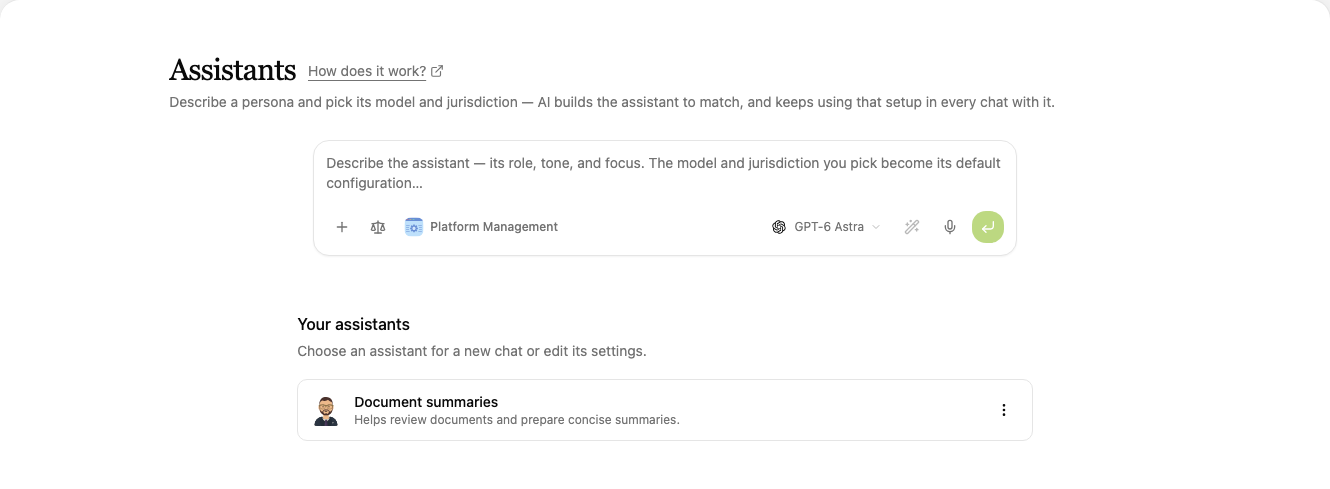
In a new conversation you pick an assistant with the Assistants tile below the input field.
Creating an assistant
-
On the Assistants page, describe the assistant's role, tone and focus in the Describe the assistant field. For example:
Create an assistant called contract-reviewer. It reviews draft contracts under Czech law, finds risky and unbalanced clauses, points out missing standard provisions and adds a reference to the statute wherever something is disputable. It answers briefly in bullet points and always proposes a specific change.
-
Choose the model and jurisdiction in the toolbar below the field. Both stay the assistant's default configuration.
-
Send the request. CODEXIS AI builds the assistant's name, description, instructions and tools from your description, and the assistant appears in the list.
The more specifically you describe the role, the procedure and the style of answers, the more precisely the assistant works. Anything that does not fit you can fine-tune later when editing the assistant.
Conversation with an assistant
Click a card to open a conversation with the assistant. Below its name you see the description and a Message field with the assistant's name, where you enter the task. The assistant answers according to its instructions, model and jurisdiction.
Editing an assistant
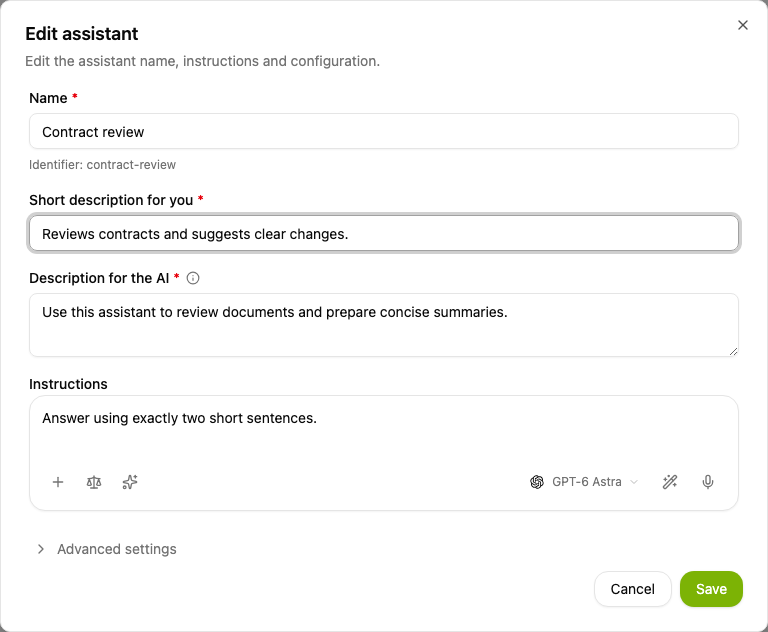
On the Assistants page, open the ⋮ menu next to the assistant and choose Edit.

In the Edit assistant form you change the Name, the Short description for you shown on the assistant card, the Description for the AI and the Instructions. In the toolbar below the instructions you set the model, jurisdiction and skills. Under Advanced settings you limit Max Turns and choose the Tools the assistant may use and the Disallowed tools. Confirm the changes with Save.
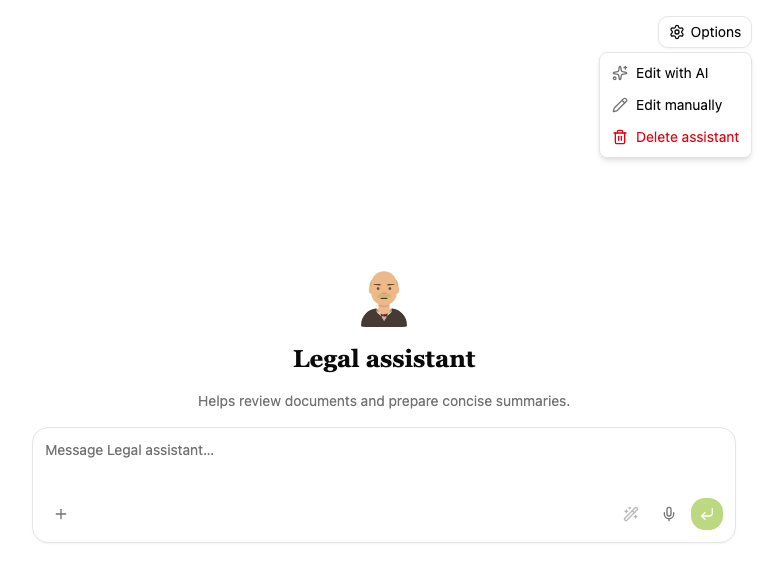
You can also edit an assistant straight from its conversation. Open the Options menu in the top right:
- Edit with AI puts the message "Edit your configuration:" into the field. Add what should change and send the message.
- Edit manually opens the Edit assistant form.
- Delete assistant removes the assistant.
Next steps
The difference between Chat and Agent mode is described in the Conversation chapter. The procedures and tools an assistant uses are in the Skills chapter.
Datify - Digital AI Office
The Datify - Digital AI Office plugin connects CODEXIS AI Agent to Datify. The AI then reads and edits your collections, datasets and records.
13. Allowed model, EU and ZDR settings
The license administrator decides which models users may pick: specific allowed models, only models with EU data processing, only models with zero data retention (ZDR), or a combination. It is set in Credit Management; other models cannot be selected and conversations running on them are locked.