

History and conversation search
Find an earlier CODEXIS AI conversation by its content as well as its name, narrow the search to one project, and pick up unfinished work from the history in the left panel.
There are two ways back to earlier work. When you remember what it was about, search by content. When you worked on it recently, find it in the history in the left panel.
Searching conversations
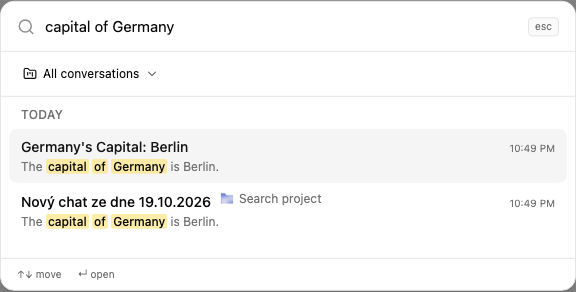
Click Search conversations in the left menu and type what you are looking for.
The search covers the content of all your conversations, not just their names. Each result shows the conversation name, the project it belongs to, the date and a snippet of text containing your term. That way you also find conversations whose name has nothing to do with the term. Results are grouped by time, for example This week and Older.
If you have created projects, you can limit the search to a single project. Click All conversations above the results and pick the project you want to search in. The results then only include conversations from that project.
Use the up and down arrows to move through the results and Enter to open a conversation.
History in the left panel
Under History you find your conversations, newest first. Click one to continue where you left off. The icon next to the name hints at the type of conversation, such as an attached document or a linked automation.
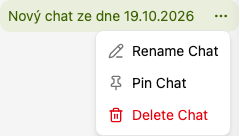
Each conversation has a menu with three actions:
- Rename conversation changes the name so the history is easier to scan.
- Pin conversation keeps it at the top, within reach.
- Delete conversation removes it. The action cannot be undone, which is why it is red in the menu.
It pays to name conversations after their topic, for example "Lease review, client X". You will then recognise them at a glance in the history and in search results.
Next steps
Conversations about one matter can be grouped into a project. To learn how to submit new work, see Conversation.
3. Conversation
Start a new conversation in CODEXIS AI. Choose Chat or Agent mode, enter your question, attach documents and set skills, jurisdiction and model.
5. Connecting storage and drives
Connect OneDrive, SharePoint or a network drive to CODEXIS AI Agent. The Connections page keeps them together and lets you browse their files.